Library on Me
Every document the airline publishes, searchable by title or code, with filters for new revisions, bookmarks and category.
 Hawk & Mason
Every crew member flies with the current manual, and you can prove it.
OM-A, OM-B, the cabin crew manual, SOPs and bulletins on the crew phone, current revision only, with what changed and from when. It opens offline on a layover, the old revision disappears when a new one is published, and each crew member's confirmation comes back to your documentation office.
Arrive as a PDF by email or a portal download. Nobody is sure which copy on the tablet or phone is current.
Are buried in a long file. The crew member has to find what changed before reading it.
That each crew member has read a revision is collected on paper or chased by email.
The phone holds the current revision only, says what changed in two lines, opens offline and sends the confirmation back.
Inside the Crewops Crew app your crews already use for their roster, in seven languages.
Every document the airline publishes, searchable by title or code, with filters for new revisions, bookmarks and category.
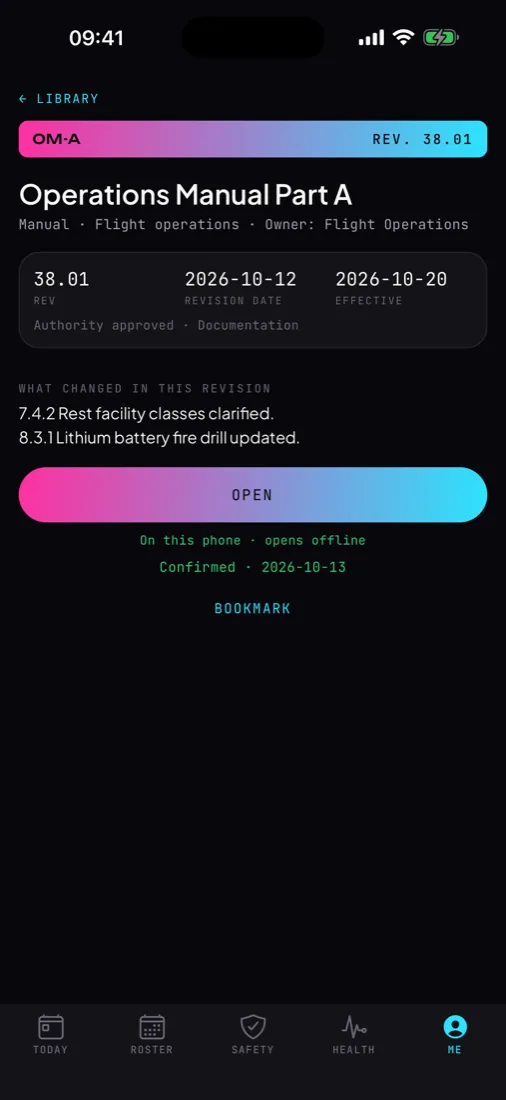
Code, title, revision, revision date, effective date, owner and authority approval at the top, then what changed in this revision.
One tap keeps the file in the app's private storage, so a manual opens on a layover with no signal. When a new revision is published, the old file is removed; a withdrawn document leaves the phone.
When the revision asks for it, the crew member confirms with one tap, with the date. A confirmation made offline waits and goes out later.
The documents a crew member opens most, kept at the top.
Opens in the browser with your airline's operator code. Nothing to install.
Code, title, type (manual, procedure, policy, bulletin, form, checklist, regulation, certificate), category, revision, revision and effective dates, change log, file link, authority approval, and a read-and-confirm with its due date.
One click opens the document with its code and title filled in. The phones pick up the revision the next time the app opens, and the older offline copy is removed.
Confirmations against crew on record for every revision that asks for one, and the crew codes with their dates.
Takes a document off every phone. It stays in the history on the panel.
Documents live, revisions in the last 30 days, revisions awaiting confirmation, crew on record.
Revision control is what the manual rules already ask for. Library makes it visible on the phone. Crewops Library supports your compliance; your procedures and records remain the reference.
Each product is licensed on its own. When your airline holds more than one, they share the crew app, the crew codes and the data.
A procedure changed after an investigation goes out as a new revision with its change log and a read-and-confirm.
Uses the same crew codes and phone pairing. A revision that needs training can be followed by an assigned course.
An assistant that answers only from your approved documents and cites the section it used. Built with a launch operator.
Your airline gets an operator code for the panel and a crew code for a group of your crews. They install Crewops Crew from a link and the product opens. Nothing to integrate on day one.
Your categories, your document codes, your notice types and your language are set during the trial, so the first version fits the department that uses it.
Crewops Library is licensed on its own, per operator, for the period you choose. What your airline holds is what opens; your crews see nothing else.
No. Crewops Library is the crew member's reference copy and the revision and confirmation trail. It is not an approved EFB application, and your EFB and its approvals stay as they are.
On your document server. The documentation office publishes a link with each revision, and each phone downloads the file once into the app's private storage.
Yes: a two-page demonstration manual, fictional and written for this page, is the file the demo library uses.
The Crewops Crew app, your airline's code and their own crew code. No account and no password. Crews of an airline that has not bought Crewops Library do not see the Library.
Tell us how your department works today and what it needs to change. One developer reads it and answers within a working day, in English or Turkish.
Crewops is independent software by Hawk & Mason Studios. Regulation references say which rules a feature is built around; they are not a statement of approval by any authority. Your procedures, records and approved systems prevail.