For the safety office

Crewops Safety

Your safety office hears about every hazard while it is still a hazard, with the facts already filled in.

Crews report from the phone they already carry, in a few minutes: sixteen kinds of report, from an air safety report to a bird strike, an injury at work or a commander's discretion. The flight, route and duty come from the roster. Your safety office classifies, acts and writes back, and the reporter reads the reply on the same screen. Reporting grows when it is easy and people hear back.

Licensed on its own · trial with a group of your crews · runs in the Crewops Crew app and your browser

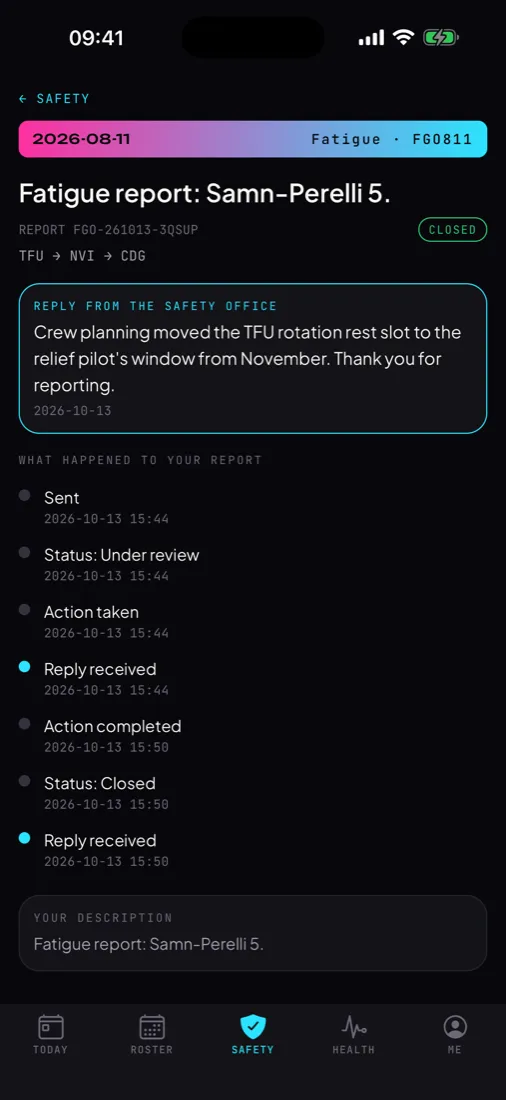
Crewops Safety on the phone: a closed fatigue report with the safety office's reply and the report's timeline
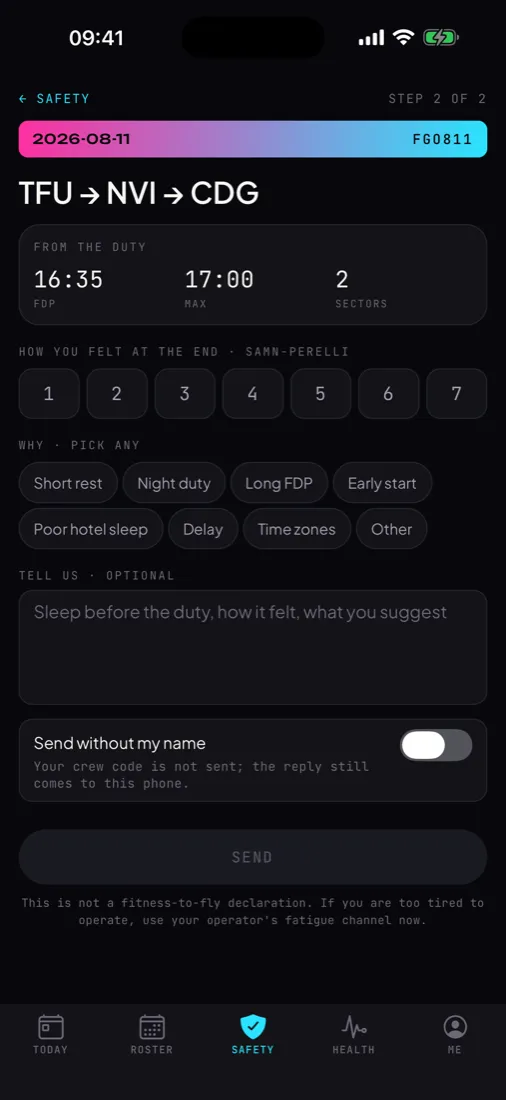
Crewops Safety on the phone: a fatigue report started from the duty, with FDP against its limit and the Samn-Perelli scale
The problem

Why reports go unwritten

Today

A report is a web form behind a company login, or a paper form in the crew room, filled in days later from memory.

The details

Flight number, date, route and duty times are typed again by hand, and the safety office corrects them later.

The reporter

Rarely hears what happened to the report, so the next one is not written.

With Crewops Safety

The report starts from the duty on the phone, can be written offline, and the reporter follows its status and reads the safety office's reply on the same screen.

On the crew phone

What your crews see

Inside the Crewops Crew app your crews already use for their roster, in seven languages.

Every report your airline runs

Twelve safety reports: flight operations, cabin, ground and cargo, security, dangerous goods, hazard, technical, health and safety at work, fatigue, bird and wildlife, commander's discretion, suggestion. Four operational reports: irregularity, environment, quality, operations control.

Three steps

Choose the kind of report, pick the duty from the roster, answer that kind's own questions and write what happened. Date, flight, route and duty times come from the roster.

The questions that matter

Each kind asks its own: phase of flight and the event list for a flight report, the disruptive level and what was done on board for an unruly passenger, UN number and class for dangerous goods, injury, body part and treatment at work, birds seen and struck and the parts hit for a bird strike. Tap what you know; the safety office completes the rest.

Commander's discretion

The planned and maximum FDP come from the roster and the FTL engine, the actual from the on-blocks or the commander's entry, and the discretion used is worked out. The commander adds the reason and the report, as ORO.FTL.205(f) asks.

Fatigue report

Starts from the duty with its FDP against the limit and the number of sectors. The crew member gives a Samn-Perelli score and picks the reasons: short rest, night duty, long FDP, early start, poor hotel sleep, delay, time zones.

Without my name

Any report can be sent without the crew code. The reply still comes back to the phone that sent it, so an anonymous reporter can be asked for more and can answer.

Status and reply

Sent, under review, action taken, closed: each step is on the phone with its time. The safety office's reply and its questions arrive there, and the crew member can add information.

Offline

Written in a hotel with no signal or on the apron with the phone in flight mode, the report waits on the phone and goes out when it is back online.

In the Safety tab

Reporting has its own tab in the crew app, beside the roster. Nothing to install, no account: crews already hold the app and your airline's code.

On your panel

What your department does

Opens in the browser with your airline's operator code. Nothing to install.

The report box

Open reports, reports due within 24 hours on the 72-hour clock, fatigue and operational reports, closed and anonymous counts, with safety and operational reports filtered apart. Every report with its kind, date, flight and status, and the reporter's own answers labelled under it.

Classification

Status from new through triage, investigation and action to closed. Occurrence category on the ADREP taxonomy of Regulation (EU) 376/2014 Annex I, mandatory reportable under Regulation (EU) 2015/1018, risk class on the ERCS scheme, event type.

Actions and timeline

Corrective and preventive actions with an owner, closed when done. A timeline of everything that happened to the report, for the investigation file and the audit.

Reply and ask

A reply goes straight to the reporter's phone, and so does a request for more information. An internal note stays on the panel and is never shown to the reporter.

Export

The report register as CSV, with the Annex I fields, for your occurrence database, your SMS records or your reports to the authority.

Regulatory basis

Built on the rules you work to

The fields, the clock and the classification come from the rules your safety office already works to. Crewops Safety supports your compliance; your procedures and records remain the reference.

  • Regulation (EU) 376/2014: occurrence reporting, the 72-hour reporting window and the Annex I data fields
  • Regulation (EU) 2015/1018: the list of occurrences that must be reported
  • Regulation (EU) 2020/2034: the European Risk Classification Scheme (ERCS)
  • ICAO Annex 19 · ORO.GEN.200: hazard identification and internal safety reporting in the management system
  • ORO.FTL.120: fatigue reports as an input to fatigue risk management
  • Türkiye · SHY-OLAY: the national occurrence reporting rules published in September 2026; an export template is prepared before they apply
One data layer

Works with the other products

Each product is licensed on its own. When your airline holds more than one, they share the crew app, the crew codes and the data.

Crewops Insight

Fatigue reports and the crews' shared post-flight ratings sit on the same operator page as the roster fatigue assessment, where the predicted alertness for that duty can be read.

Crewops Academy

A lesson from a report goes out as a safety bulletin to read and sign, and the safety office sees who has signed it.

Crewops Library

A procedure changed after an investigation goes out as a new revision with its change log and a read-and-confirm.

How it starts

Trial first, then a licence

1 · A trial

Your airline gets an operator code for the panel and a crew code for a group of your crews. They install Crewops Crew from a link and the product opens. Nothing to integrate on day one.

2 · Your way of working

Your categories, your document codes, your notice types and your language are set during the trial, so the first version fits the department that uses it.

3 · A licence

Crewops Safety is licensed on its own, per operator, for the period you choose. What your airline holds is what opens; your crews see nothing else.

Questions

What departments ask first

What can crews report?

Everything an airline's reporting system takes: twelve safety reports, from an air safety report to a commander's discretion report, and four operational reports for irregularities, environment, quality and operations control. The 72-hour clock runs only for occurrences; operational reports and suggestions go to the box without one.

Is Crewops Safety a complete SMS?

It is the reporting and follow-up core of one: reports from the crew, classification, actions, replies and the register. Risk registers, audits and bow-tie analysis are not in the first version. If your operation needs them, they are built with you on the same base.

Who can read a report?

Your safety office, on its panel, with your airline's operator code. Reports are kept in a workspace set up for your airline. An anonymous report carries no crew code, and the reporter's reply channel is stored only as a one-way hash.

Does it replace our reporting system?

It can, or it can feed it. The CSV export carries the Annex I fields, so reports filed from the phone go into the occurrence database you already keep. Many operators start with fatigue reports and cabin reports, where paper and email are still common.

What do our crews need?

The Crewops Crew app and your airline's code. No account and no password. Crews of an airline that has not bought Crewops Safety do not see the Safety tab.

Talk to us

Start Crewops Safety with a group of your crews

Tell us how your department works today and what it needs to change. One developer reads it and answers within a working day, in English or Turkish.

hello@hawkmason.com

Crewops is independent software by Hawk & Mason Studios. Regulation references say which rules a feature is built around; they are not a statement of approval by any authority. Your procedures, records and approved systems prevail.