My Training
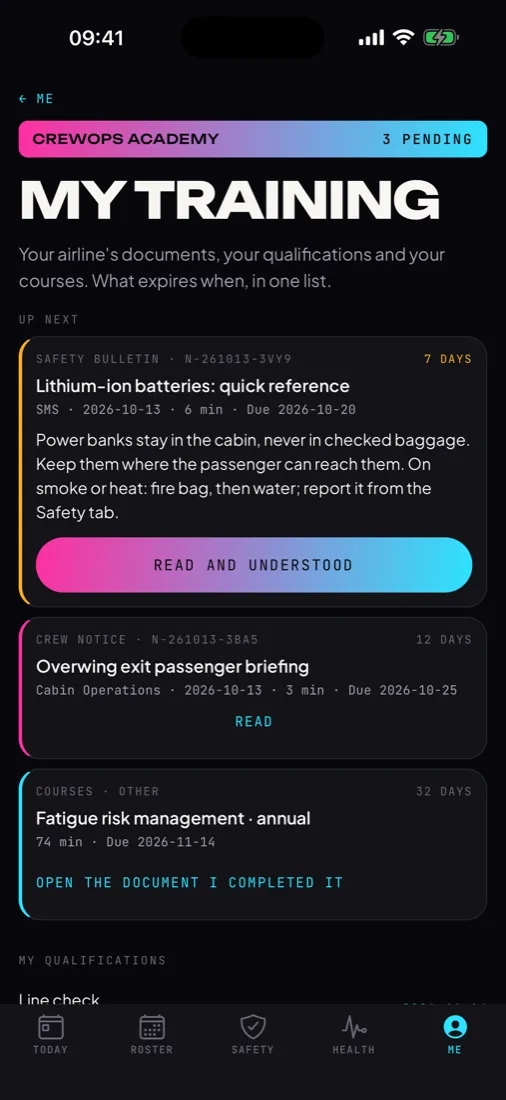
One screen on Me: what is up next, how many items are pending, and the days left on each, in colour as the date gets close.
 Hawk & Mason
Nobody flies with an expired check, and nobody can say they never saw the notice.
Each crew member sees their own qualifications and expiry dates on the phone (OPC, LPC, line check, SEP, dangerous goods, CRM, first aid, cabin recurrent, medical, licence) and signs notices and bulletins there. Your training department sees what has expired, what expires within 30 days and who has not signed, on one page, with every signature dated.
Live in the training system or a spreadsheet. The crew member learns about an expiring check from an email, or from a roster change.
Go out by email or a crew portal. Proving who read which one before a duty takes a day of chasing.
Are assigned in one place, completed in another and confirmed by hand.
The crew member opens My Training and sees what is next and when it expires. The department sees the gaps across the fleet on one page, and every signature with its date.
Inside the Crewops Crew app your crews already use for their roster, in seven languages.
One screen on Me: what is up next, how many items are pending, and the days left on each, in colour as the date gets close.
Crew notices, safety bulletins, safety memos, coordination sheets, security notices, training documents and revisions, each with its reading time and due date. One tap signs it, with the date.
Each check and course on record, with the date it was done and the date it expires, as the training department holds them.
An assigned course opens its document or link. "I completed it" sends the completion, and the training department verifies it.
The feed stays on the phone and reads with no signal. Signatures made offline wait and go out when the phone is back online.
The first phone that opens a crew code is paired with it, so a colleague cannot read someone else's records by typing their code. The department can reset a pairing.
Opens in the browser with your airline's operator code. Nothing to install.
Crew on record, qualifications expired, expiring within 30 days, notices overdue and notices live. A table of everything expired or expiring, by crew code and role.
Upload a CSV exported from your training system: crew code, role, name, item, issued, expires. Each crew member's record is replaced by the new rows, so the phones show what your system holds.
Publish a notice to everyone, to flight crew or cabin crew, or to a list of crew codes, with a due date and reading time. See who has signed and who has not.
Assign a course with a due date and a link to your material. Completions come back from the phones for the department to verify.
The records on file as CSV, for your training system, your audit file or your authority.
The qualification types and their validity periods are the ones the crew rules already set. Crewops Academy supports your compliance; your procedures and records remain the reference.
Each product is licensed on its own. When your airline holds more than one, they share the crew app, the crew codes and the data.
A lesson from a safety report goes out as a bulletin to read and sign, and the safety office sees who has signed it.
A new manual revision can ask for a read-and-confirm; the same crew codes and pairing are used on both.
Qualifications and the roster already live in the same crew app. Checking a due date against the duties around it is the next step, built with a launch operator.
Your airline gets an operator code for the panel and a crew code for a group of your crews. They install Crewops Crew from a link and the product opens. Nothing to integrate on day one.
Your categories, your document codes, your notice types and your language are set during the trial, so the first version fits the department that uses it.
Crewops Academy is licensed on its own, per operator, for the period you choose. What your airline holds is what opens; your crews see nothing else.
No. Your training system stays the record of truth. Crewops Academy carries its records to the crew phones by CSV and brings back signatures and completions. An integration that writes back directly is built when your system allows it.
A course is a link to your existing material or a document. Course playback with tracking inside the app is not in the first version.
Yes. A notice or course goes to everyone, to flight crew, to cabin crew, or to a list of crew codes.
The Crewops Crew app, your airline's code and their own crew code. No account and no password. Crews of an airline that has not bought Crewops Academy do not see My Training.
Tell us how your department works today and what it needs to change. One developer reads it and answers within a working day, in English or Turkish.
Crewops is independent software by Hawk & Mason Studios. Regulation references say which rules a feature is built around; they are not a statement of approval by any authority. Your procedures, records and approved systems prevail.